
Playground Basketball Kobe Build: Physicals, Badges, and Attributes
The Playground Basketball Kobe build uses a 6'5" shooting guard frame weighing 180 pounds with the shooter archetype to hit fadeaways, pull-up threes, and contested layups. Upgrading speed to at least 60 keeps the build competitive on defense.
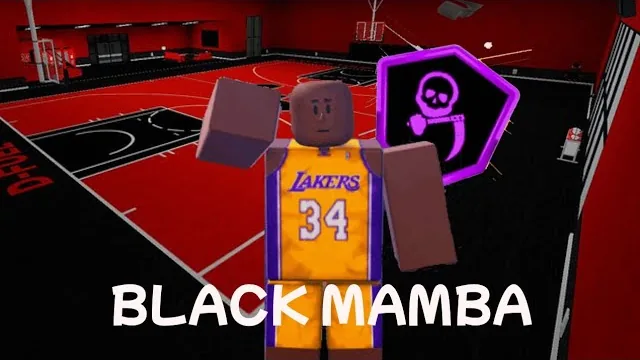
The Playground Basketball Kobe build uses a 6'5" shooting guard frame weighing 180 pounds with the shooter archetype to hit fadeaways, pull-up threes, and contested layups. Upgrading speed to at least 60 keeps the build competitive on defense.
Physical Setup and Archetype Selection
Creating the build begins in the character customizer developed by Playground Basketball | Community (Group). Setting the skin color to earth orange provides the deepest available tone. The position must be set to shooting guard to match Kobe Bryant's signature off-guard scoring role.
For physical measurements, select a height of 6'5" and a weight of 180 pounds. Selecting 6'5" aligns with the best height for balanced perimeter guards, offering enough elevation to contest shots without dropping into forward territory.
Under the archetype menu, select Shooter. Kobe was defined by perimeter scoring, three-point range, mid-range pull-ups, and baseline fadeaways. Selecting Shooter prioritizes these scoring attributes directly at player creation.
Badge Focus and Offensive Mechanics
The build relies heavily on perimeter shooting badges to open up scoring opportunities. Equipping Mid-Range Specialist provides consistent green shot meters on contested baseline turnarounds and pull-ups. Layup badges work alongside the shooting package, allowing contested finishes and jelly layup attempts around the rim.
Because a fresh Shooter build spawns without default handling packages, players must learn how to dribble and acquire specific dribble moves before entering competitive queues. Without handling packages equipped, isolation scoring relies on basic pump fakes and the bunny step move. In 1v1 gameplay, stringing together bunny steps creates enough space to bait defenders into jumping, leaving open windows for green three-pointers.
Speed Upgrades and Allocation Choices
A fresh 6'5" Shooter profile suffers from noticeable movement sluggishness. When matched against smaller, quicker point guards, default speed leaves defenders vulnerable to straight-line drives. Spending match coins to bump speed to 60 solves defensive recovery issues without draining currency balances.
| Build Allocation | Tactical Situation | Investment Cost |
|---|---|---|
| Default Base Speed | Testing shot timing against stationary opponents | Zero coin expenditure |
| Speed 60 Upgrade | Defending quick ball-handlers in competitive 1v1 games | Coins earned from completed matches |
| Cheap Builds Gamepass | Upgrading multiple player slots across seasons | 799 Robux one-time purchase |
Players testing multiple setups alongside the best build on the court can manage attributes and gamepasses to speed up progression.
Progression and Slot Management
Players looking to experiment with variations can purchase the Extra Slots gamepass for 299 Robux to store two additional build slots. Account progression also benefits from active codes released on the official Roblox game page, which reward bonus currency to fund attribute upgrades like the speed milestone. Players with Roblox Premium receive exclusive perks and bonuses directly while competing on the court.
Related Guides
Kyrie Build Options
Review build management passes, coin upgrades, and slot options for configuring a guard profile in Playground Basketball.
LeBron Build
Review physical dimensions, archetype combinations, exact attribute caps, and takeover selections to construct a dominant LeBron James build on the court.